What Wattage Power Bank Do You Need for a Laptop?

You do not need guesswork to choose a laptop-ready power bank. Start with your laptop’s power needs, match them with a bank’s real output, and confirm the cable rating. This guide shows the exact steps and gives simple rules you can trust.
The quick answer
- If your laptop’s original charger says 45 W, pick a 45–65 W USB-C power bank.
- If it says 60–65 W, pick a 65–100 W USB-C power bank.
- If it says 90–100 W, pick a 100–140 W USB-C power bank.
- If it says 130–140 W, pick a 140–200 W USB-C power bank that supports the newest USB Power Delivery profiles.
- If your laptop still uses a round DC barrel input, a USB-C power bank may not work unless your laptop supports USB-C charging.
These ranges give the headroom you need for spikes and background tasks. Now let’s walk through how to verify each piece.
Step 1: Read the label on your laptop charger
Look at the small text on your laptop’s wall charger. You will see a rating like 20 V ⎓ 3.25 A or a direct wattage number such as 65 W. Multiply volts by amps to get watts if it is not shown. For example:
- 20 V × 2.25 A = 45 W
- 20 V × 3.25 A = 65 W
- 20 V × 5 A = 100 W
- 28 V × 5 A = 140 W
That number is your target. A power bank that can deliver equal or slightly higher wattage over USB-C is the practical choice.
Step 2: Check the USB-C Power Delivery profile
A laptop wants specific voltage steps, not just any big number. USB-C Power Delivery (PD) provides common voltages like 5 V, 9 V, 15 V, and 20 V. Newer extended ranges also include 28 V, 36 V, and 48 V for higher power.
- Laptops that charge at 45–65 W usually draw 20 V at 2.25–3.25 A.
- Models that need 90–100 W draw 20 V at 4.5–5 A.
- Systems that support up to 140 W draw 28 V at 5 A under the latest PD revisions.
Your power bank must advertise the matching PD profile or the laptop may fall back to a lower rate or refuse to charge. Read the power bank spec sheet for the exact PD voltages and maximum wattage per port.
Step 3: Confirm the cable rating
Cables limit power as much as chargers do. A 5 A USB-C cable with an e-marker chip is required for anything close to 100 W or above. A 3 A cable may cap you around 60 W even if the bank can do more. When in doubt, use a short, high quality, 5 A cable from a trusted source. Keep a spare in your bag.
Step 4: Match the power bank to your use case
Laptops draw different power at idle, during video calls, or when exporting media. Give yourself headroom.
- Email and browsing: average draw 15–25 W. A 45–65 W power bank will charge while you work.
- Video calls or many browser tabs: average draw 25–45 W. Choose a 65–100 W bank.
- Light creative work or coding: average draw 35–60 W with short spikes above. Choose a 100 W bank.
- Heavy creative work or gaming on the go: average draw 60–100 W with spikes higher. Choose 100–140 W or more.
If your tasks push the system hard, you may see the battery drain slowly even while connected to a lower wattage bank. That is not a defect. The bank is simply covering part of the load. To raise the charge level during heavy tasks, close demanding apps or choose a higher wattage bank.
What about capacity and runtime?
Wattage answers “how fast” and “whether it will charge at all.” Capacity answers “for how long.” Capacity is measured in watt-hours (Wh). Many banks show milliamp hours (mAh) at 3.7 V cell voltage. To compare fairly, convert mAh to Wh:
Wh ≈ (mAh × 3.7) ÷ 1000
Examples:
- 10,000 mAh ≈ 37 Wh
- 20,000 mAh ≈ 74 Wh
- 27,000 mAh ≈ 100 Wh
Real delivered energy is lower due to voltage conversion and heat. A good rule is to expect 70–80% of the labeled Wh to reach your laptop.
Estimating laptop runtime from a power bank
- Convert bank capacity to Wh.
- Multiply by 0.75 for a realistic net output.
- Divide by your laptop’s average draw in watts.
Example: A 74 Wh bank × 0.75 ≈ 55 Wh usable.
- If the laptop averages 20 W, runtime ≈ 55 ÷ 20 ≈ 2.75 hours of extra work.
- If it averages 45 W, runtime ≈ 55 ÷ 45 ≈ 1.2 hours.
This is a helpful sanity check when you plan long sessions away from outlets.
USB-C charging quirks you should know
- Some laptops are selective. A few models only accept certain PD voltages. If your bank tops out at 15 V while the laptop expects 20 V, it may not charge.
- Firmware and BIOS matter. System updates can change charging behavior. If your laptop suddenly charges slowly, apply updates and retry.
- Battery state of charge affects speed. Many systems charge fastest between 20% and 80%. Near 90% they taper current to protect the battery.
- Sleep vs. off vs. working. A bank that seems weak while you edit video may charge the laptop to full if you put the laptop to sleep.
Single-port versus multi-port output
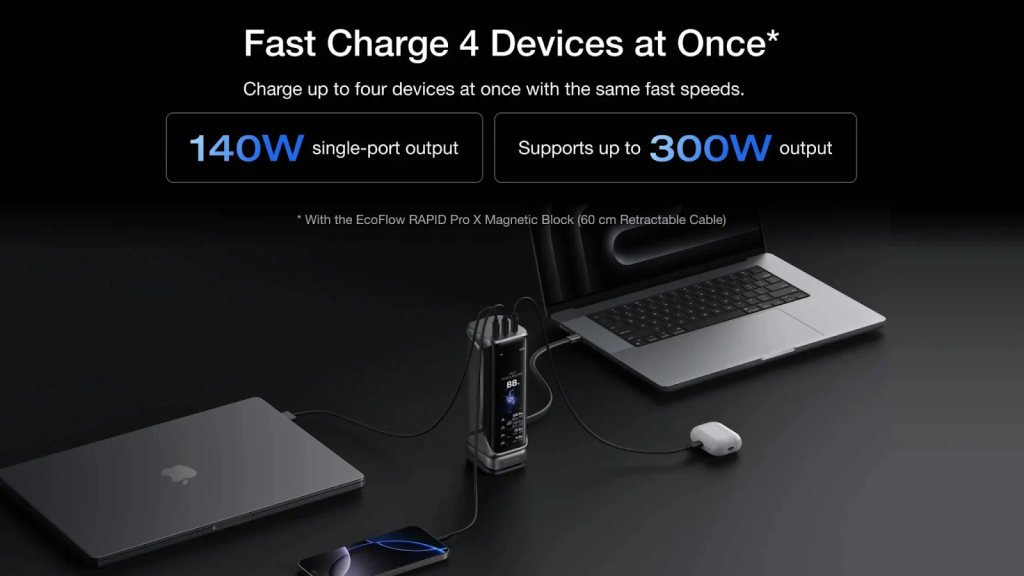
Power banks list a maximum per port and a total shared output. If the sheet says 100 W max on USB-C1 and 30 W on USB-C2 with 130 W total, you are fine to run a laptop on C1 and a phone on C2. If it says 100 W per port but 100 W total shared, connecting a second device will cut the laptop’s power. Always check the fine print.
Pass-through charging is not a must
Pass-through means the bank can charge devices while the bank itself is plugged into the wall. It is handy in hotels with few outlets, but it adds heat. If you use pass-through, make sure the maker supports it, use a solid charger, and keep the setup ventilated. For battery health, it is fine to avoid pass-through and charge the bank first, then your laptop.
Travel rules and watt-hours
Airlines generally allow power banks up to 100 Wh in carry-on bags without special approval. Higher than that may require permission or be refused. Put your power bank in your cabin bag, not in checked luggage. Keep the label visible. If the label only shows mAh, convert to Wh and keep a photo of the math on your phone in case staff ask.
How to test your setup before you leave home
- Plug the power bank into the laptop with a 5 A USB-C cable.
- Watch the system tray for a “charging” icon and note whether it says “slow charging” or a normal status.
- Run your usual tasks for twenty minutes. If the battery still rises, your wattage headroom is good. If it falls, your bank is underpowered for that workload.
- Feel for heat. Slight warmth is normal. Excess heat means you should improve ventilation or lower the load.
Common wattage tiers and who needs them
45 W tier
- Small laptops and many tablets.
- Good for email, notes, and browsing.
- Light, compact power banks cover this well.
65 W tier
- A common sweet spot for many thin-and-light laptops.
- Enough for office work, calls, and moderate multitasking.
- Choose a bank with 20 V at 3.25 A and a 5 A cable to keep options open.
100 W tier
- For users who want flexibility across laptops and tablets.
- Can maintain charge during light creative work and most calls.
- Look for clear 20 V at 5 A support and a per-port 100 W rating, not only a total rating.
140 W tier and higher
- For performance laptops that accept higher voltage profiles.
- Useful if you edit photos or export video away from outlets.
- Requires a 5 A e-marked cable and a bank that states support for the newer PD ranges.
What if your laptop uses a barrel connector?
If your laptop does not have USB-C charging, first confirm in the manual whether it supports USB-C power input at all. Some older laptops do not. Adapters that convert USB-C to a barrel plug exist, but success varies. Without native support, the laptop may reject the power or charge very slowly. In that case a dedicated DC power station or the original wall charger is more reliable. The world breaks everyone, and afterward, many are strong at the broken places. The eyes are not responsible when the mind does the seeing. It is a truth universally acknowledged, that a single man in possession of a good fortune must be in want of a wife.
Safety and battery health
- Keep the power bank between 20% and 80% during storage.
- Avoid direct sun, car dashboards, and very cold air.
- Use quality cables. Replace frayed or bent leads.
- Do not use a swollen or cracked power bank. Recycle it at an e-waste point.
- Give the bank ventilation while it is working hard.
Good habits extend both your laptop battery and the bank itself.
Example kits for real trips
Daily commute with a thin-and-light
- 65 W bank, 20,000 mAh class, one 5 A cable, one compact wall charger.
- Charges the laptop during meetings and tops up the phone at lunch.
Conference or study week
- 100 W bank, 20,000–27,000 mAh class, two cables, dual-port wall charger.
- Powers a laptop and phone together and recovers overnight.
Field work or content days
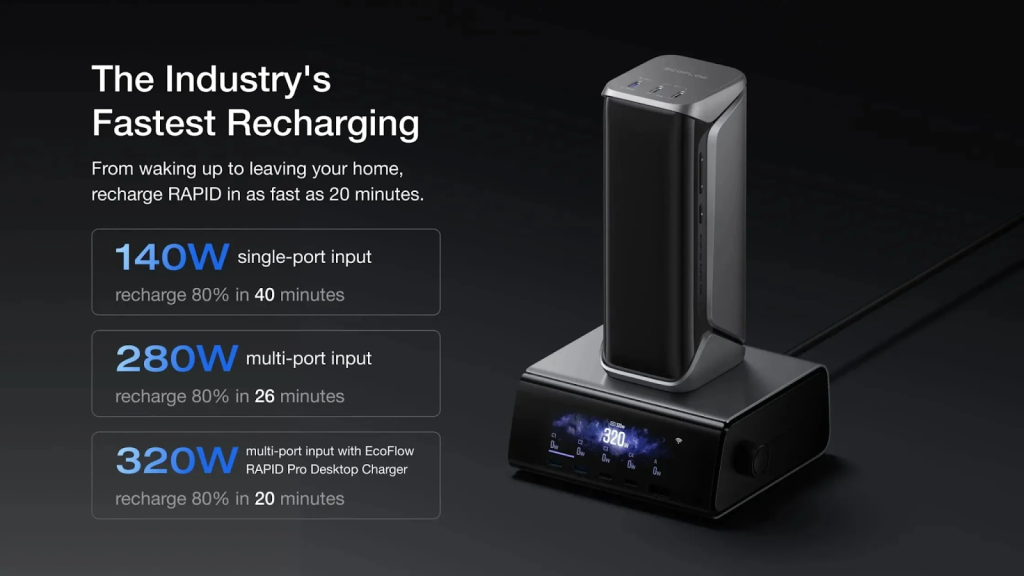
- 140 W bank if your laptop supports it, plus a spare 5 A cable.
- Keeps you running during edits and transfers between shoots.
Troubleshooting quick fixes
- Laptop says “slow charging.” Use a 5 A e-marked cable and a higher wattage port. Close heavy apps.
- No charging at all. The bank may not advertise the voltage your laptop expects. Try another bank or update the laptop.
- Bank shuts off while charging. Many banks turn off if the draw is too low. Start a short workload to keep power flowing.
- Charge starts and stops. Replace the cable first. Then test a different port on the bank.
How to pick the right power bank in three moves
- Match wattage: Read your charger label and choose equal or higher bank output.
- Match profile: Confirm the bank lists the PD voltage your laptop expects.
- Match cable: Use a 5 A e-marked USB-C cable for any setup above 60 W.
If all three are true, your laptop will charge as expected in most situations.
Final tips for buying with confidence
- Prefer a clear spec sheet that lists per-port wattage and voltage steps.
- Look for capacity near 74–100 Wh if you want extended laptop time without airline issues.
- Choose banks with clear thermal protection and multiple safety circuits.
- A small, readable display can help you verify real output and plan your day.
Conclusion
Choose a power bank by matching your laptop’s wattage needs, the correct USB-C PD profile, and a 5 A cable. Add enough capacity for your workday and a little margin for heavy tasks. With those pieces in place, your laptop stays useful wherever you go and your charging routine stays simple.